2-Way Voice on GPS 2-x
Note: GPS 1 (AT&T) guidance is available here
On the GPS 2, you can talk to your child at any time, without them needing to “pick up” or click anything!
In addition to all the AngelSense features you know and love, you can:
Instruct your child to stop, avoid a road, or stay away from any potential threat
Help your child transition smoothly between places and activities during the day
Give them more independence, guide or calm them down, and easily stay connected
You can authorize an unlimited number of users to call your GPS 2 device.
See who’s called your Angel today
During an Emergency you can combine Tracking, 2-Way Voice (AngelCall), and the Alarm feature for help with finding your lost child
Set a Default Call mode for each user so they can dial the device directly, without having to use the app, and it will either use 1-Way Voice (Listen-In) or 2-Way Voice automatically. Grandparents can call just to say hi!
We suggest speaking loudly, clearly, and slowly, as the device is typically secured inside of clothing.
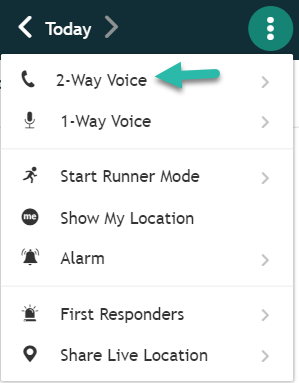
- Click the menu on the right hand side when viewing your Timeline.
- Then, choose 2-Way Voice for a two-way conversation. The dialer will pop up with the device’s phone number. Select “Call”. (You can configure the Settings in your Menu. See: 2-Way Voice Settings)
Note: During calls, the device cannot transmit GPS data and thus if are on a call (1-Way Voice or 2-Way Voice) with the device throughout the entire transit, the system will miss the transit.