» BackLogging into app
To use the AngelSense native (installed) app do the following:
- Download the AngelSense app for iOS or Android
- You can also use the web app on any device with an internet browser. You can access the web app:
- From the AngelSense website (As of 8/5/2024)
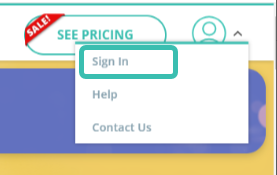
- Select the icon in the top right corner
- Select ‘Sign In’, which opens the web app for you
- Or by simply opening this link http://app.angelsense.com in your internet browser (for non iOS/Android phone or PC)
- Choose the correct option:
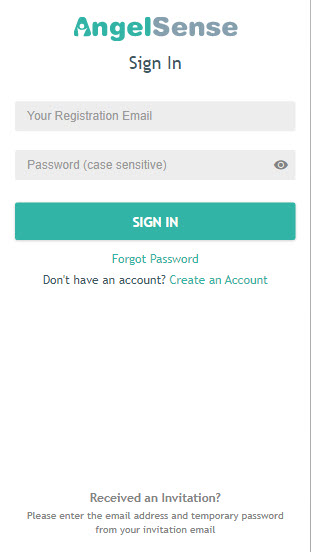
- Sign In: For those who already have an AngelSense account and device for their Angel
- Enter your user name (the email address you registered with) and password
- Click “Show password” to verify you are typing the right password (case sensitive)
- If you forgot your password click “Forgot Password” to have a new one sent to you
- After your first login, the system will automatically login without requiring your credentials
- Create a New Account: For those who purchased from a 3rd party
- Invited To Be A Guardian: For those who were invited by a Primary Guardian to be a Guardian

Note for iPhone/iPad Safari browser users (using the web app):
1. Make sure cookies are allowed: Settings → Safari → block cookies → select always allow
2. If needed delete your cache: Settings → Safari → clear history and website data → clear history and data
NOTE: It is important that Guardians log in with their own email address instead of having a shared login. This will prevent issues with notifications and logging in.