» Back
Premium Watch Health Monitoring (Beta)
This program is part of our ongoing mission to push the boundaries of what technology can do to improve safety, health, and peace of mind for families. Your participation will directly help us build tools that can make a real difference in detecting and responding to seizure events.
***Please note if you do not have app version 4.1 or higher, you will not see the Health Menu in your app. Please update your AngelSense app if that is the case.
Health Menu:
The Health Menu is located in the lower right corner of your AngelSense Timeline view in the app:
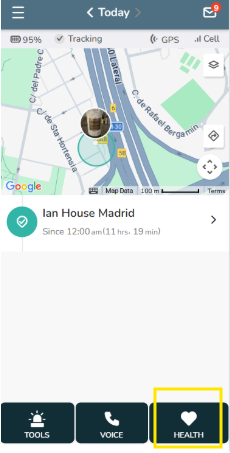
The Health Menu Contains:
- Heart Rate Monitoring Display
- Daily Steps
- Seizure Symptom Reporting [Beta]
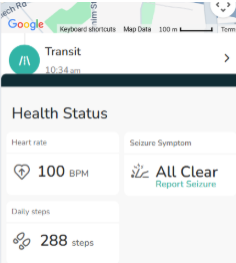
Seizure Reporting:
To Manually Report a Seizure, open the web app, click the Report Seizure Icon, and a survey will open; please fill out the fields to help us learn how to better detect your loved one’s seizures.
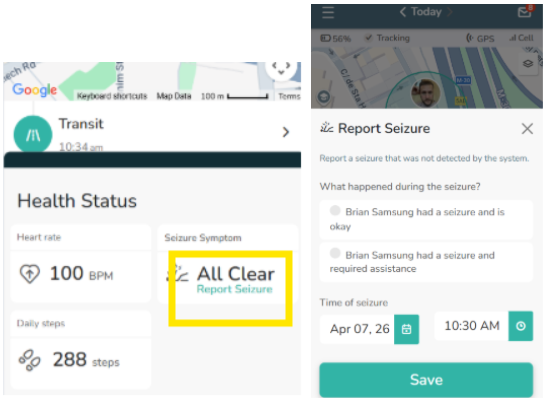
There is also automatic seizure detection. As the pilot develops and the system learns more about your loved one’s seizure symptoms, it will improve. When a seizure is suspected by the AngelSense system, it will auto alert you. You will get a notification based on your predefined notification settings.
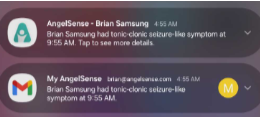
**A new seizure reporting survey is available on the web app, asking you to confirm details of the event. You can save the web app to your Home screen for easy access when reporting seizures.
Notifications and Settings:
There is currently 1 notification type; this will display with the other notification settings in the app.
The settings for these will be predefined in the Notification tab of your app Menu.
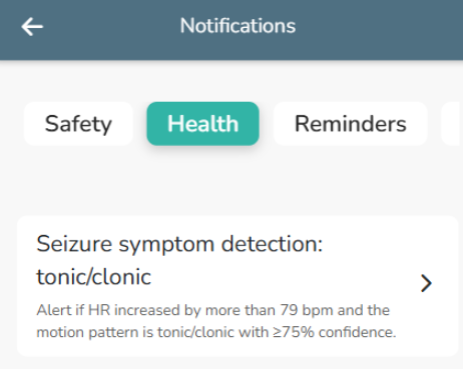
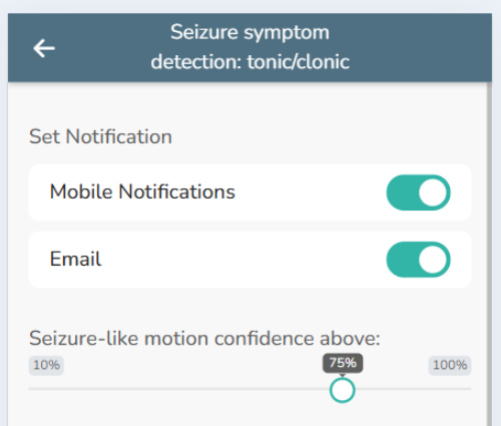
Notification: Seizure Symptom Detection: Tonic/Clonic
- This notification is triggered when motion patterns match tonic or clonic seizure activity.
- Seizure-like motion: A computed score representing how closely the detected movement matches known tonic/clonic patterns. The notification is triggered only if this confidence exceeds a defined threshold.
- Require Elevated Heart Rate:
- Increased by a certain number of Beats per Minute: The heart rate must increase by a minimum value relative to baseline.
- The Baseline Meaning: A personalized reference value calculated from the user’s historical resting heart rate data. This will require your loved one to wear the watch for the system to establish a baseline heart rate.