
» Back
Premium Watch Battery Life, Power Saving Modes, and Charging
Battery Life
Using AngelSense’s new and improved Smart Power Management algorithms, the battery power can last up to 16 hours (depending on usage). The current GPS tracking device’s long battery life allows the AngelSense GPS to provide continuous real-time updates that keep tracking information accurate and reliable all day.
Safety is our #1 priority and when every second counts, it’s important to know exactly where your loved one is. This is why AngelSense ONLY uses continuous monitoring and DOES NOT use ‘standby mode’ that is common with most other GPS devices. Standby mode compromises safety, is less reliable, and the location tracking is highly inaccurate as it only queries the GPS after waking up. In cases of elopement, instantly accessing accurate location information is crucial, so to avoid any delays we opted for daily charging and provide charging reminders to make sure you don’t forget.
We created AngelSense to be more than just another ordinary GPS tracking device, we designed it to be a complete safety device that will truly keep our loved ones safe and address the unique concerns of parents and caregivers for those with special needs. The rich array of Lifesaving Features we are able to provide require a more durable battery and daily charging. To us, this was an insignificant detail if it means knowing our loved ones are as safe as possible at all times.
While AngelSense and RF search systems are both used for locating a missing person, the solutions are very different as outlined in this comparison document.
Notes
- Initially, while your device is proactively learning your routes and most visited locations are being named, battery life can be impacted and you can expect to see improved battery life after the first two weeks of usage.
- The Premium Watch takes 1.5 – 2 hours to fully charge.
Preserving Battery Life
With the new and improved AngelSense you can experience an improved Battery Life!
To provide maximum protection for your loved one, AngelSense offers several life-saving features that require a bigger battery and regular charging. To make sure your battery lasts as long as possible, here are some tips:
- Assure Place Borders are Large Enough – This also helps decrease false alerts
- Use Certain Features Moderately – Runner Mode, 2-Way Voice, 1-Way Voice and SOS Call Direct use extra battery power
- Charge Device Fully – Leave connected to the charger until ready to use
Some more about the battery:
- The battery lasts up to 16 hours with normal use after a full charge (2 hours)
- Poor cellular reception depletes battery more quickly
- After the first 2 weeks of use, you should automatically see improved battery life as the device learns your locations and area.
Note: Battery usage of the device is not affected by keeping the app open or receiving notifications.
Power-Saving Mode
Discover new Power Saving Modes for Extended Battery Life on the Watch!
To optimize your battery usage:
Go to ‘Settings’ and ‘Device’
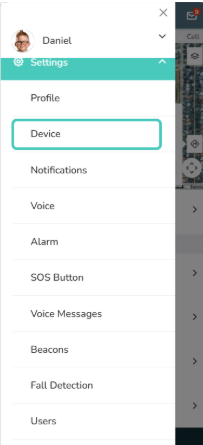
Choose your preferred power mode of Standard or Medium
- Standard: Enjoy continuous tracking, proactive alerts, and smooth routes with updates every 30 seconds during transits.
- Medium Power Saving: Recommended if your loved one is in transit for at least an hour a day! This mode reduces transit updates to 3 minutes, balancing energy conservation and update frequency.
Charging the Device
The AngelSense Premium Watch is charged with a magnetic charging dock and turns on when it is plugged in. It takes between 1.5 and 2 hours to recharge the battery.
To charge the battery:
- Connect the USB-C connector to a USB outlet and place the watch on the magnetic charging puck.
- Charge the watch near a window with good cellular reception, so that it stays connected to your app.
- Ensure the watch is charging:
- While connected, the watch face will show the battery level.
- If the battery is empty, it will take approximately 20 seconds to power on.
- The app status bar will show a lightning bolt next to it.
Note:
- We suggest keeping the watch charging when not in use and not let the battery run out.
- There is no power button on the watch. It will power off when the battery runs out. It will power on automatically when placed back on the charging dock.